Most of you plan your bike rides using online tools such as Komoot, Strava, Bikerouter, or similar platforms. While the route creation feature now works well across all of these platforms, I am not entirely satisfied with the current options for saving and displaying personal highlights – specific route segments that I prefer to include in my rides.
I know the roads in my immediate surroundings very well, but as soon as I venture further away, my local knowledge diminishes. You can work with, for example, the Strava heatmap or Komoot highlights, but both solutions are only partially helpful for me. The heatmap does not provide enough clarity, and most of Komoot’s highlights are not what I am looking for (e.g., “beautiful flowers”) as a road cycling highlight. Bikerouter, a fantastic open-source tool, currently offers no way to save route segments.
► Get the route highlights and simulation plugin for Chrome (here) and Firefox. Opera is pending release inthe addon store.
For these reasons, I started developing a small browser extension that allows users to mark, categorize, and save route segments as highlights. The tool works with the route planners Komoot (komoot.com), Bikerouter (bikerouter.de), and RideWithGPS (ridewithgps.com), and created highlights can be displayed on the maps of all supported planners, regardless of where or how they were created.
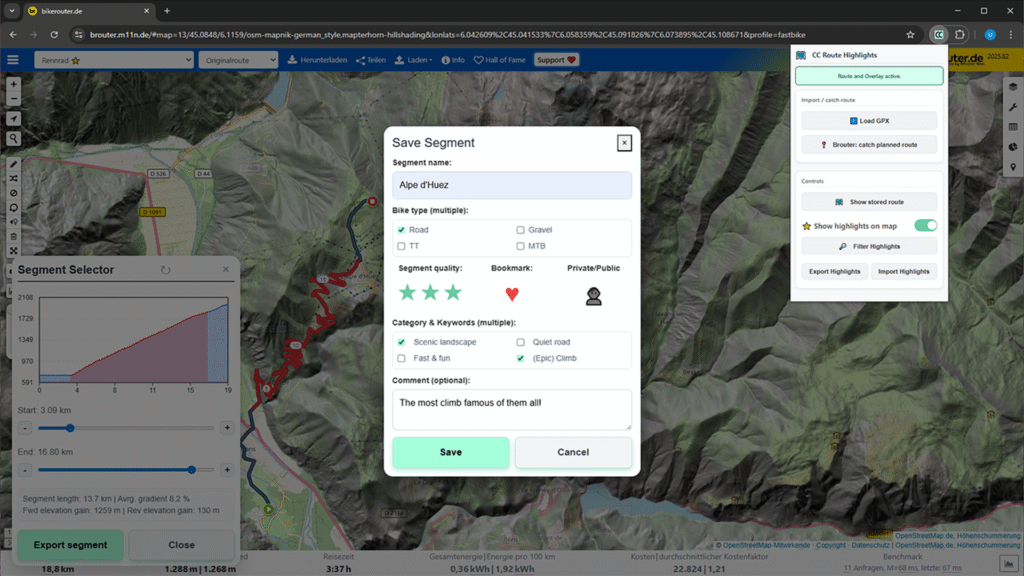
Currently, the extension only allows the creation of personal highlights, which are stored in a database within the extension and are therefore only available locally on a single device. However, all highlights can be exported and imported on another computer, or after a reinstallation or browser change. Originally, I created the extension solely for personal use, but if there is interest, I would consider adding a server backend to store and share highlights.
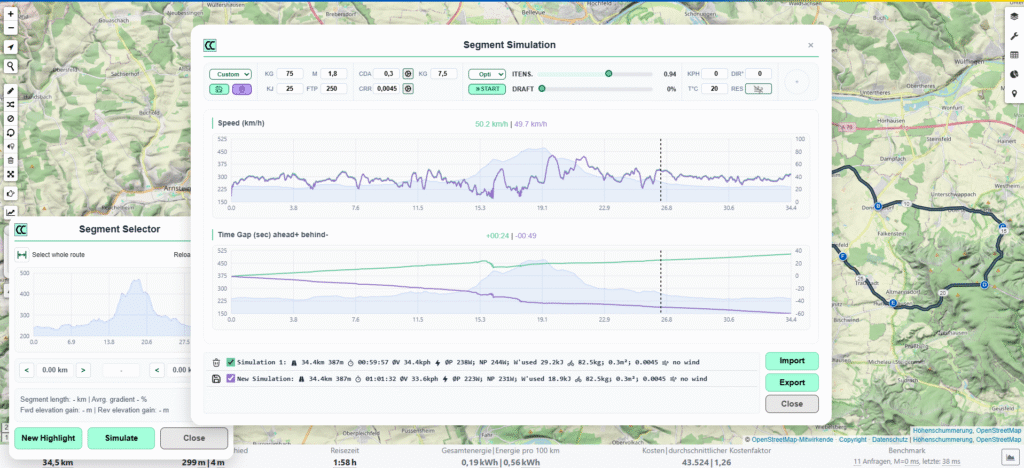
New: the plugin now allows to simulate riding a segment or a whole route depending on rider/bike parameters and ambient conditions.
With version 1.1 I added a collection of features that analysze a route or a route segment and simulates riding it with different paces and strategies. Parameters like weight, air resistance coefficient, draft, or wind allow to adapt the model to a situation that you want to analyze and calculate. Use cases can range from a simple time estimation for a given route, to optimization of a time trial or a bike marathon. The simulation results can be exported as .gpx or .tpx which contain the route coordinates and also timestamps for all route points. This will allow you to compare your time to the simulated pacing on your bike computer while you are riding.
The extension is available under the name “CC Route Highlights” in the Chrome Web Store. A Firefox version will follow. Please note that this is the first published version, offering only basic features and likely still containing some bugs. I welcome any feedback and suggestions for additional features.
Interested? Check the basic features shown in this short video:
Data privacy
The extension does not store any personal information. When using the simulation feature which calculates speed and time for a route or segment, the extension sends a timestamp and the first coordinate point of that route/segment to this website. The purpose is to get some information on the usage of the simulation feature. To ensure data privay, the coordinates are blurred to roughly 1.5 km so the exact start point of a simulation cannot be read from that data. There is no other information like IP adresses stored – purely the coordinates.